

In the last week, four different people have asked me to help them get started with Claude Code. And if you’ve read my how-to guides before, you know, once people start asking in droves, I make a guide.
This is that guide.
But … before we do anything else, I want you to understand the philosophy this guide is built on: what separates people who succeed with agentic AI from people who don’t is clarity of intent. Not technical knowledge. Not coding background. Clarity. If you internalize nothing else from this guide, internalize that.
This how-to guide is for you if . . .
You’re a non-technical beginner who wants to understand that from the inside out.
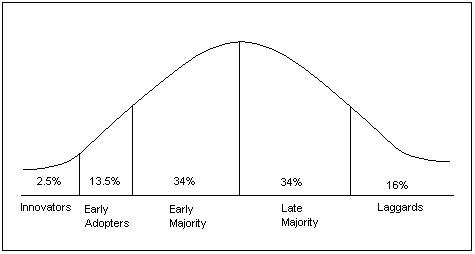
You have this internal voice telling you that you MUST be, at the very least, an ‘Innovator’ on the curve of early adoption. I.e., you need to jump on this whole tech wave now.
You are intuitively allergic to the fear-mongering slop snake oil sales of ‘dashboard this’ ‘app that’ crawling around the internet, and want to learn about this tech with no crypto-/NFT bro use cases.
A note on tools and terms:
Claude Code, Gemini CLI, Cursor, Amazon Q are all the same paradigm, different wrappers. I borrow from Steve Yegge in calling all of these “Claude Code,” but what that really means is vibe coding with agentic AI (this will make sense momentarily). The brand matters less than understanding what the paradigm requires from you. Use whatever you have access to (e.g., Cursor is free for a year for students). This guide uses Claude Code and its April 2026 desktop app, but the concepts transfer everywhere.
It’s not about coding,
For non-technical beginners, the anxieties of getting started are many. I am sure you will see yourself in one of these:
“This feels like upskilling. I don’t want to have to do work after work.”
“I don’t believe in AI, I want to make things myself.”
“It’s going to get into my computer and do things on my behalf and fuck up my life.”
“I have no idea what I’m doing. The last and only time I wrote code was setting up my Myspace.”
“I have to learn this, or I am going to lose my job.”
I concede, you can leave all those anxieties behind, and adopt a new and singular one:
“Do I truly understand what I want to make?”
it’s about clarity.
I might have to eat the following words one day, but today is not that day:
I categorically think the only thing to being successful with vibe coding and agents, is learning how to get exceedingly clear about your intent and developing a practice of maintaining an exceedingly clean relationship to your intent over time. In other words, it is my pedagogical stance that you must learn to think like an engineer, which has always comprised two parts:
Engineering / Design / Systems Thinking
(Coding) Languages
Large Language Models (LLMs), the spine of conversational AI ( which you will learn more about shortly ) have made the latter obsolete, arguably, by making the translation between the language you speak and the coding language essentially flawless. Which means that if you are learning to think like an engineer in 2026, you do not need to know commands; you need to know what you want. You need to know what you want soooooooooo specifically, soooooo structurally, that when an agent attempts to work on your behalf, it (1) actually understands you and you (2) are confident (enough) that you understand it.
This sounds simple.
And while it isn’t simple, per se, we will break it down herein. With each session you practice clarifying your intent, you will get increasingly clear about what you want, and increasingly competent at steering agents from a helm of direction, vision, and audit-ability.
Before we begin: three sections to orient you.
Who are you? This is where you locate your current relationship to gen AI and where you sit on the adoption curve.
What are you actually signing up for? This is where you understand what you’re giving an agent access to on your computer, and at what cost.
Do you want to be taught by me? This is where you decide if my teaching philosophy and approach to this material is right for you.
01 Who are you?
If you are reading this before June 2026, you are mathematically on the early part of the adoption curve. Not because you feel like an early adopter ( I know a lot of you don’t ), but because that’s just what the math says. You are objectively early to the party. Meaning you are here before the consumer products smooth lots of the kinks this guide walks you through out.
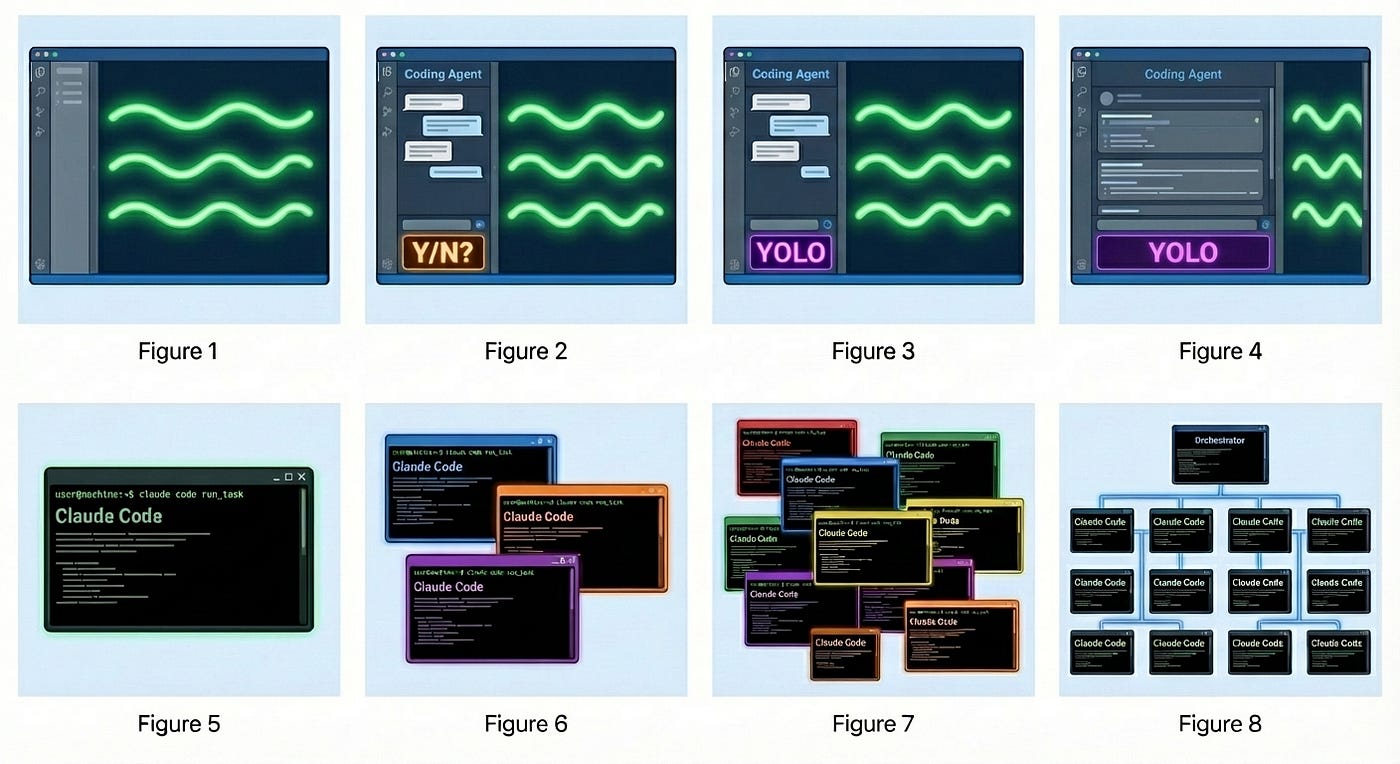
With all that said, first, I want you to understand where you are in your own personal evolution of the gen AI use (adapted from Steve Yegge’s ‘Welcome to Gas Town’). As Yegge asked his readers in January, you should locate yourself on my adapted version of his chart. Look at the stages and their respective descriptions below and find yourself.
Stage 0: The Web
Pre-2022. You typed queries and wandered through results clicking, reading, triangulating, deciding what to trust based on what ranked. The AI under the hood was classification and ranking: sorting things that already existed, not creating anything new. You were the synthesizer. The web gave you a sorted pile; you made the meaning.
Stage 1: Conversational AI
2022. The first consumer generative AI product: a chat interface that actually generates. Question → answer. You ask, it produces something new, not a list of existing things. You copy what’s useful and take it somewhere. Nothing acts on your behalf. But for the first time, the output is made for you specifically.
Stage 2: Building with Chat
You’re using conversational gen AI to build things; describing what you want, getting code or instructions back, copying it somewhere yourself. Some people at this stage connect their Google Drive as context: the model can read your files and reference them as it responds. But it’s read-only. The AI can see your work. Everything that actually gets done, you do.
Stage 3: First Agent
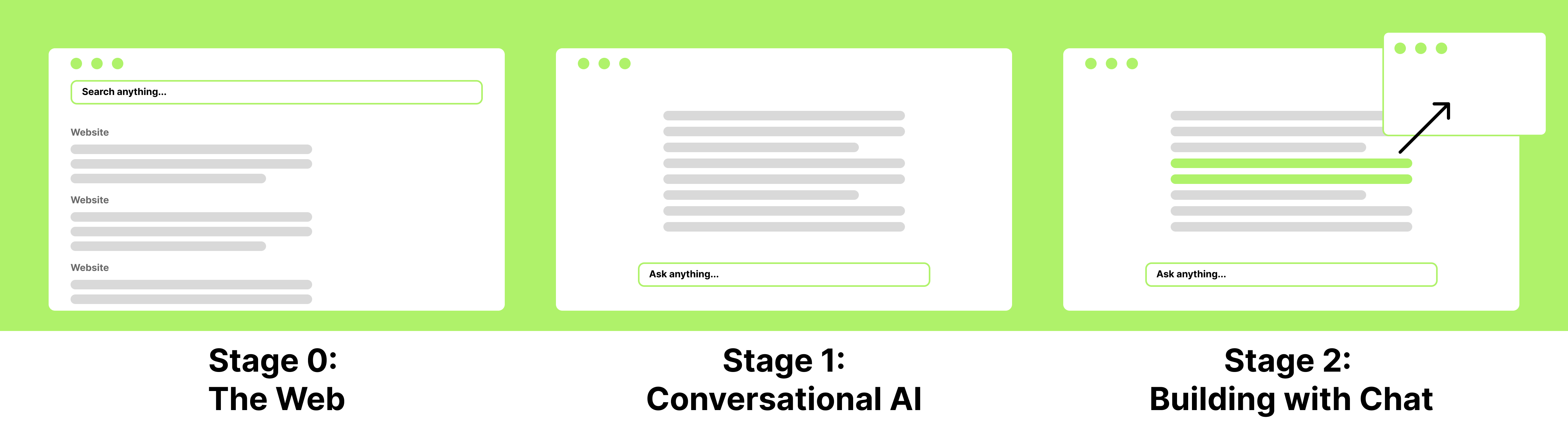
The threshold is write access. You move into an environment where the agent doesn’t just read your files (read-only) it creates them, edits them, acts on them (read and write). You’re in Cursor, VS Code, or Claude Code. The agent runs inside the tool and writes directly to your file system. You want to move faster, do more, work across a bigger context than a chat window allows. You have a second chat window open on the side for when a command appears you don’t recognize. You read every permission prompt before you authorize it. This is agentic AI: goal → result, executing across multiple steps on your behalf.
Stage 4: Trust Mode
Same setup. But you’ve started hitting allow before you finish reading the prompt: you’re impatient, you’ve built enough trust, or it’s late. The default is always allow and you’ve stopped fighting it. The permission prompts were your last line of active oversight; now you’re reviewing output, not individual actions. The agent has more room to move.
Stage 5: Wide Agent
The agent takes up most of the screen. Code scrolls by and you glance at it rather than read it. Your role has shifted. You’re not a gatekeeper anymore, you’re a director. You set the goal, review what came back, and steer. More happens between your inputs and your next check-in.
Stage 6: Multi-Agent
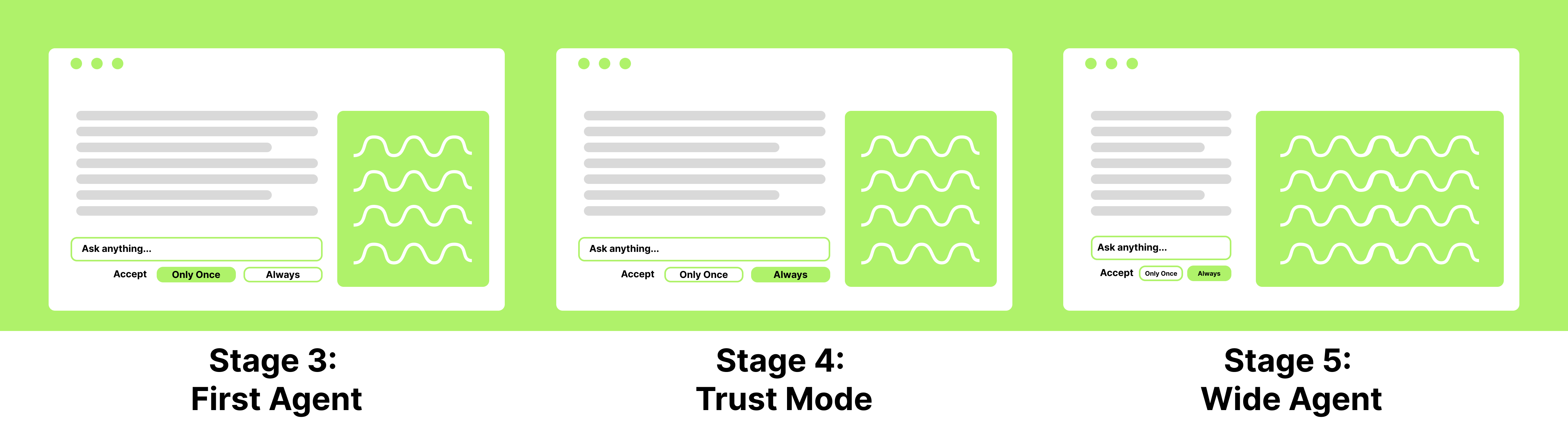
Multiple agents running at once — split screen, multiple IDEs, something like tmux/cmux. The skill has changed: it’s no longer about giving one agent precise instructions, it’s about decomposing a problem into parallel tracks and managing how they connect. You’re thinking in threads, not steps.
Stage 7: At Capacity
10+ agents, hand-managed. You’re tracking what each one is doing, what it needs, what it’s about to touch. The overhead of coordination is becoming the work itself. You’re hitting the ceiling of what you can hold in your head at once.
Stage 8: Orchestration
You’ve started building the system that manages the agents. Routing tasks, chaining steps, handling outputs is now something you’re automating rather than doing by hand. You’re not using the tools anymore; you’re building the infrastructure that runs them. You are on the frontier.
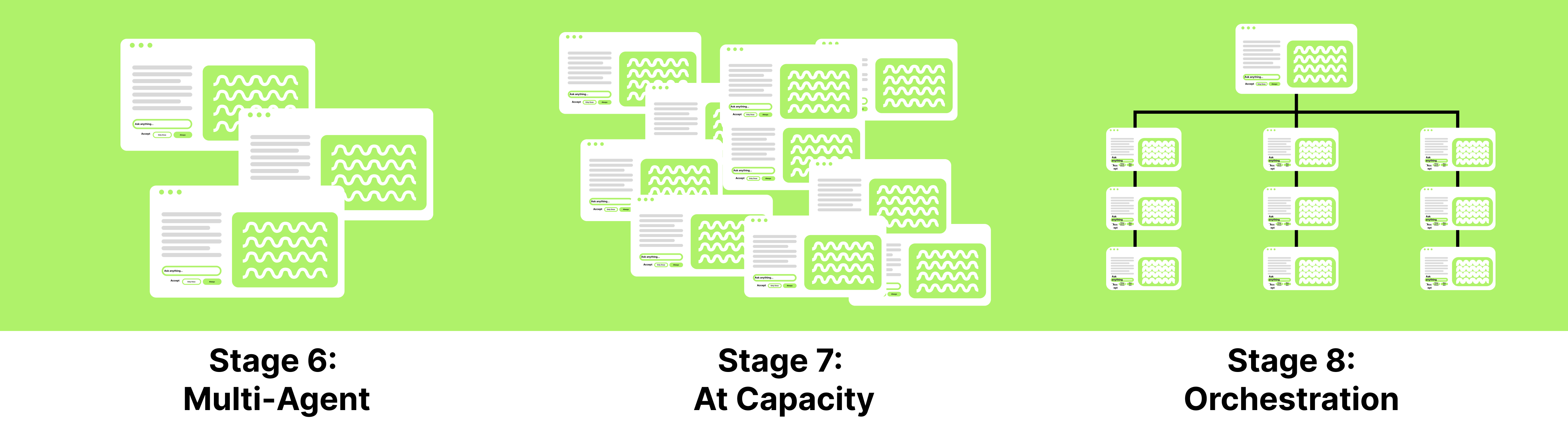
Don’t be intimidated by all the stages. I expect you are on Stage 1 or have dabbled in Stage 2 but are feeling wobbly. We will get a foundation under you so you can up-stage in time confidently.
Now, how we got here:
The first thing I do when I introduce a non-technical person to agents is make sure they understand that:
Artificial intelligence (AI) has existed for almost a century.
What broke onto the scene in 2022 is a kind of AI called “generative AI” (gen AI)
Until ~2025 we accessed this gen AI through “conversational AI”
Since then, we can also access gen AI through “agentic AI”
All of these AI variations ultimately have the same underlying tech: code
Understanding this, hopefully, helps to dispel some of the myths around superpowers. And, as a power user of conversational AI, you should feel more than confident to lean into agentic AI, as you so bravely are now!!
Artificial Intelligence (AI)
Before 2022, for tools used by the general public, artificial intelligence (AI) was used to classify and predict. Recommendation systems (Spotify, Netflix, news), spam filters, autocomplete, grammar checkers. In other words, AI sorted and ranked things that already existed.
Generative AI
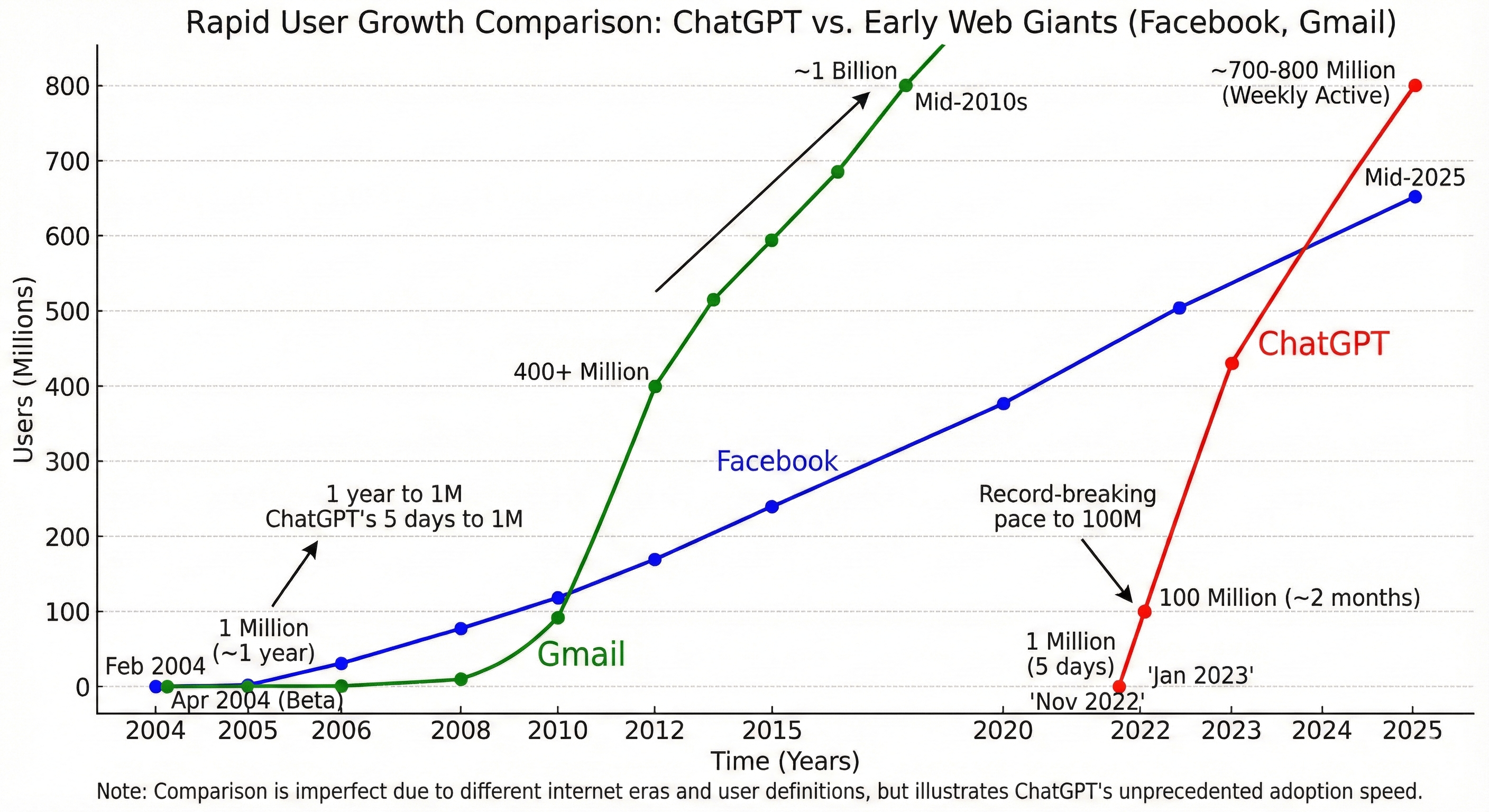
Then generative AI arrived in 2022 with the fastest onboarding to a new tech the world had ever seen: systems that produce novel output. Text, code, images, apps. This is the category everything in this series belongs to.
Within generative AI, there are two modes that matter here:
Conversational AI: Question → Answer (Read Only)
Is what you use daily. The paradigm that best describes it is: question and answer. You ask, it responds. No actions taken, nothing created unless you copy it somewhere yourself. Claude.ai, ChatGPT, Gemini chat. The interface you’re probably used to.

Agentic AI: Goal → Result (Read and Write)
This is what every billboard in San Francisco is hocking these days. The paradigm that evest describes it is: goal and result. You specify an intention, it executes across multiple steps. Files get created. Code runs. Commands happen on your actual computer. Claude Code, Gemini CLI, Cursor. These are agents.
When you are feeling like
Conversational AI is blocking you creatively,
it’s time to switch to Agentic AI.
. . .
The shift from conversational to agentic is the one that changes what you have to bring to the interaction. With conversational AI, a vague prompt produces a vague response and you try again. With agentic AI, a vague intention produces an agent that fills the gap with its own assumptions. Those assumptions compound. An hour later, you have output that’s coherent to the agent and wrong for you. This is essentially what slop is.
02 What are you actually signing up for?
Before you waste any heartache, let me say this: you do not need to be an ‘early adopter’ (likely anyone who adopts Claude Code before fall 2026) let alone an ‘innovator’ (anyone who adopts it before summer 2026). This tech is coming for everyone, and in the next 18 months, consumer products will solve a lot of what I’m about to describe.
So . . . if being out on the frontier is not for you ( because it still is the frontier, and if you ever played the Oregon Trail, you know how risky venturing into the great beyond can be ) that’s okay. Wait. These tools will improve.
But if you MUST hop on the wagon now, welcome. Here is what you are signing up for.
First, your computer is the workspace.
Most beginners don’t fully absorb this at first. Some have a vague fear about it and don’t proceed. It is safe to proceed. You just have to actually understand what the agent is doing so you don’t end up somewhere you didn’t intend.
Here is where it gets slippery.
Say you open the agent, point it at your Desktop, and ask it to organize a project folder. Partway through, it determines that completing your goal requires touching something outside that folder. It may do it even if you didn’t explicitly ask it to.
In other words: the agent’s model of the task boundary and your mental model of it are not the same thing. You will encounter this again and again. You’ll ask for something you perceive as small and contained, and it will be interpreted more broadly than you expected.
But here’s the thing, you might be the problem.
Computers are scrupulously pedantic. Humans are often gestural with intention. There is no better illustration of this gap than the peanut butter and jelly sandwich challenge. I show this every year in my thesis class:
The instruction “put the peanut butter on the bread” means something completely different to a human and a machine. To an agent, your instruction is the ceiling of what it can infer. If your goal was a sandwich, the instruction needed to say so.
So if the tool does more than you expected, it is very likely because you were not specific enough about two things: what it should do, and what it should NOT do.
Second, there are distinct layers of permission and privacy worth understanding.
We will cover how to navigate these hands-on in the tutorial. But understanding them conceptually before you encounter them matters.
Permission.
Your computer is not just your Desktop. Think of it like a building. The Desktop is one room you’ve been living in. There are other rooms: your Documents, your Downloads, your system folders, external drives, cloud storage. You may have never opened most of them. They are still there.
When you install an app and it asks “can this access your files?” or “can this access your microphone?” that question is coming from the part of your computer that manages all those rooms. That is your operating system (OS): the software that runs everything underneath the apps you use. macOS, Windows, and Linux are all operating systems. Most people have been using one for years without thinking about it.
When you gave Claude Code permission during installation, you were telling your OS which rooms it could enter. That is the outer wall.
The inner wall is what happens inside the app. Once Claude Code is running, it will ask you before it takes certain actions: “should I do this just this once, or always?” That choice controls how much it does without checking in with you. We will go through exactly what to click and why in the tutorial.
Both walls matter more as the agent’s responsibilities grow. When an agent can call APIs (connections to external services like your calendar, a database, or a payment processor) or use MCPs (the protocol Claude uses to connect to those tools), it can reach far beyond your local files.
WARNING! Claude does not always abide by what you tell it. Sometimes it will act in plan mode and sometimes it will always do something that you said “allow once to, so watch out.
Privacy.
When you type something into Claude Code, paste a document in, or point it at a folder full of files: that content is being sent to Anthropic’s servers to be processed. This is true of almost every AI tool you use. Most people accepted this when they signed up, without reading the terms.
What that means practically: things you share with the agent may be stored, and depending on your plan and settings, may be used to improve the model. Most people click through the terms of service without reading them. That is the same thing you have done with almost every app on your phone. This is not different in kind, but it is worth being conscious of, because with an agent, the volume and sensitivity of what you might share goes up fast.
And it does not stop at Anthropic.
When your agent uses third-party tools via MCPs or API connections, the data in those calls goes to those services too. If the agent queries your calendar, Google receives that request. If it reads from a database or writes to a file storage service, those providers process what was sent. You likely already agreed to their terms when you made your accounts. What changes with agents is that something is now acting inside those services on your behalf, and it may pass more context than you’d expect in each call, not just your query, but surrounding conversation, file contents, other context it determined was relevant.
So . . . treat what you share with the agent the way you’d treat email attachments. Client work, sensitive documents, confidential data: think before you paste it in. Don’t existentially panic. Apply the same judgment you’re supposed to apply to any software you use professionally.
At the very least, be aware of what is in the folder you point the agent at. Some project folders contain configuration files that store passwords, API keys, or login credentials. They look like regular text files. They are often invisible to you but readable to the agent, and readable to any tool the agent calls. We will cover these more as they come up, but know about them.
WARNING! Do not do this on a work computer for personal projects. Your employer likely owns whatever IP you produce on company hardware. There is likely activity monitoring in place. And it is probably prohibited in your contract. This is not a gray area.
Third, like conversational AI, agentic AI can be confidently wrong.
In conversational AI, a hallucination produces a wrong answer you can read and correct. In agentic AI, a hallucination executes. The agent can build across multiple steps on a faulty premise, confidently, and you won’t know until you look. And you may never know at all if you have lost the thread of your own intent or authorship along the way.
This is the structural reason why you will hear me harp on “auditable outputs” over and over in this series. I will be teaching you to build workflows that allow you to audit what the agent actually did, not just what it said it did. This is not optional. It is the whole skill.
Fourth, what this costs, minimally.
You will need a paid subscription to whichever tool you choose: Claude Code runs $20/month, Cursor $20/month (free for one year if you are a student). You will also need a GitHub account, which is free to create. I want to be specific about why GitHub is not optional: the agent can overwrite and delete your files with no built-in undo. It does not ask. It does not warn you. Without version control, anything it removes is gone for good. GitHub is the thing that makes this agentic AI survivable.
On top of that, long sessions with large files burn through tokens faster than you expect. On a paid plan, that cost can quietly accumulate. The more precisely you know what you want before you start a session, the shorter and cheaper that session tends to be.
Your clarity is your protection: in tokens, in time, in frustration, in lost work.
03 Do you want to be taught by me?
Slop is not just ugly. Slop is a diagnostic.
If you are producing output you cannot evaluate, something in your intent formation is broken. Your goal was not clear enough for the agent to build from, so it improvised, and the improvisation looked plausible enough that you accepted it. The problem is not the output. The problem is that you cannot see what is wrong with it. Which means you will keep producing it.
This is the competence ceiling nobody warns you about. It is invisible from inside it. The tutorials that teach you to build dashboards and apps in ten minutes are not teaching you to build those things. They are teaching you to ship outputs you cannot evaluate, from intentions you never fully formed.
That ceiling is why I refuse to teach from that framework. Not out of aesthetic snobbery. (But my oh my, I do think slop is ugly.) Not because there is something wrong with apps or dashboards. Because that framework to just execute does not scale past the tutorial. It is my option that the maker who accepts slop is not just making bad work: they are actively training themselves out of the very capacity this guide is trying to build: clarity of intent and personal taste.
So, what is the alternative?
Intent formation is the structural practice this guide teaches explicitly: getting clear enough about what you want that a system can act on it, specifying what it should do and what it should not, iterating not because the first output was wrong but because you are refining your understanding of your own goal.
Taste is what accretes through those iterations. The choices you make while refining your intent, the things you reject and the things you keep, the moments you say “this is close but not right” and have to figure out why: that is your taste developing. Though taste cannot be taught directly, you will not develop it at all if you do not take intent seriously first. The guide can give you the scaffold. What gets built on it is yours.
That is the pedagogy. Now you should know who is teaching it.
I am a Mechanical Engineering PhD student (aka I have been trained to think like a scientist, like an engineer). I am a person who is constitutionally allergic to outputs I cannot account for.
Because of those two positionalities, I refuse to teach you how to make things without data provenance you can’t check, or outputs with generic aesthetics that have no grounding in your own critical thinking or personal taste.
Lastly, I believe in reading. In fact, in the age of agents, I read more than I ever have: new documentation constantly, outputs I need to check, schemas I need to develop and maintain. The belly of generative AI is words. If you do not engage with them carefully, you will not like this material. I have made this as short as I could as I know your time is valuable and I don’t want you suffer. But I need you to understand that careful reading is the same practice as careful intent formation, and you will need both to be successful here.
What you stand to gain . . .
Now that you have read all of the preamble, what you will gain from this guide, if the above aligns with you:
You will learn how to ‘vibe code’ for agents with auditable outputs that demand you to develop and protect your critical thinking and taste.
You will be able to legitimately add to your resume, you can build in whatever existing professional domain you have expertise in with agentic AI.


When will part 2 come out? Very excited for this series.
I appreciate you teaching style. Do you have anticipated release date for this course?